StarCar V0.7 Is Live!


I’ve been working on this version and took a lot of feedback before I got started. Check it out here!
Here’s what’s new:
World Data System

You can now add notes to celestial bodies. Add custom notes for anything, or use structured data if you’re running Stars Without Number or Traveller. There are roll buttons for generating world data if you want StarCar to do it for you. Please join the Discord or email me if you have ideas for other systems to include.
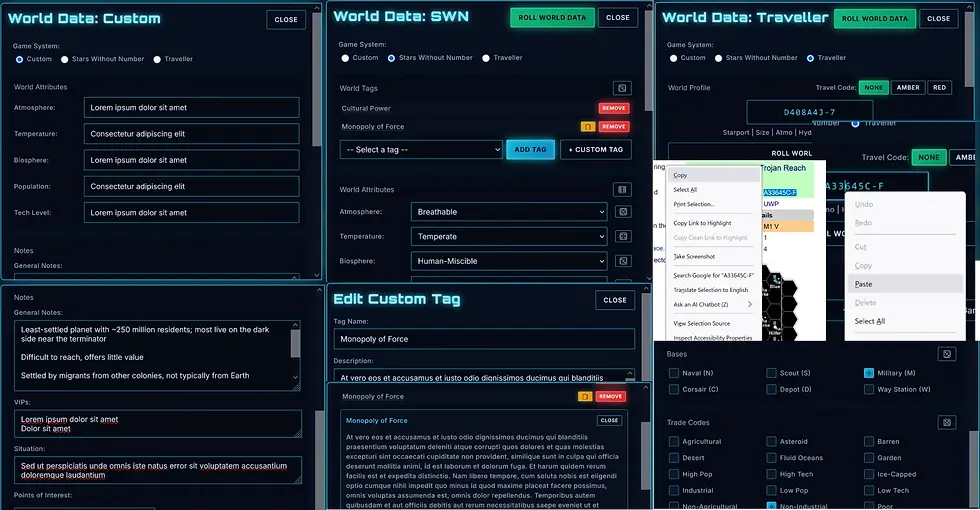
I want to be clear that the note-taking feature is janky. I know it’s janky. There’s a warning modal that pops up the first time you use it, telling you not to write anything important directly in the forms. I mean it. Write your notes somewhere else, then copy/paste them in. The system works, but it’s rough around the edges, and you might lose data to bugs. Exporting your system’s JSON file is a good way to back it up, but I’d still save any important text in a document somewhere else.
System Generator

Random generation got a major upgrade. It’s not just stars like it was before (that was always a placeholder anyway). You can now generate full systems with secondary stars, orbital bodies, satellites, and overlays. There are tons of customization options: star types, body counts, realistic vs. random modes, and naming options. You can generate world data for everything at once if you want. While I was at it, I renamed the “Generate Star” button to “Generate System,” because that’s what it does now.

The Export System Got Rebuilt

The old export modal was one cramped screen with everything jammed together. It worked, but it was messy and confusing. The new version splits everything into three paths: Export Image, Export Data, and Export Both.
Export Image is straightforward. Pick your scale, style, view mode, and format: PNG, WebP, JPG, or SVG. Same options as before, just a little cleaner, I hope.
Export Data is new. You can now export as JSON (your project save file), RTF (a text file that’s compatible with Word, Pages, Docs, OpenOffice, whatever), or PDF (read-only). You can export all bodies or just the one you’ve selected. You can skip bodies that don’t have World Data. I hope that’ll make it useful. There will be more options in the future, but that’s where it sits for now.

Export Both is brand new. You can bundle everything into a ZIP (image + data + JSON), or you can generate a Handout PDF. The handout generator combines your system image with world data into a formatted document. Multiple styles, page layouts, font sizes, cover pages, and page numbers. It’s designed for making player handouts for RPG sessions. The totally black-and-white version is disabled for now, but will arrive with the Printer Friendly image update.

Other Stuff
Traveller zone color coding (None/Amber/Red with glowing borders)
“Erase Local Data” button for when you want to nuke everything and start fresh
Label tilt range expanded to ±60°
Changed “STAR DESIGNATION” to “PRIMARY STAR DESIGNATION” for multi-star clarity
What’s Next
Quality-of-life improvements are up first: editing orbital bodies directly from the canvas, and other tweaks. If you have ideas about what would make StarCar easier to use, join the Discord or send me an email.
After that, I’m adding more star types (black holes, neutron stars, etc.), improving the artificial bodies (adding Dyson spheres, ringworlds, and more), and cleaning up the Printer Friendly export style. More UI options are coming soon, too: hiding labels, changing font colors, that sort of thing.
The full roadmap is in the app if you want to see everything I’m working on.